

These are instructions on removing or uninstalling Honor Driver from a Windows computer (Windows 7, 8, 8.1, 10, or 11).
Steps to Remove or Uninstall Honor Driver
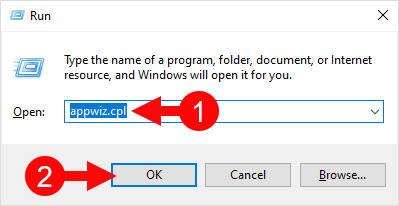
- Open Programs and Features Window on the computer. To Open Programs and Features Window: Press
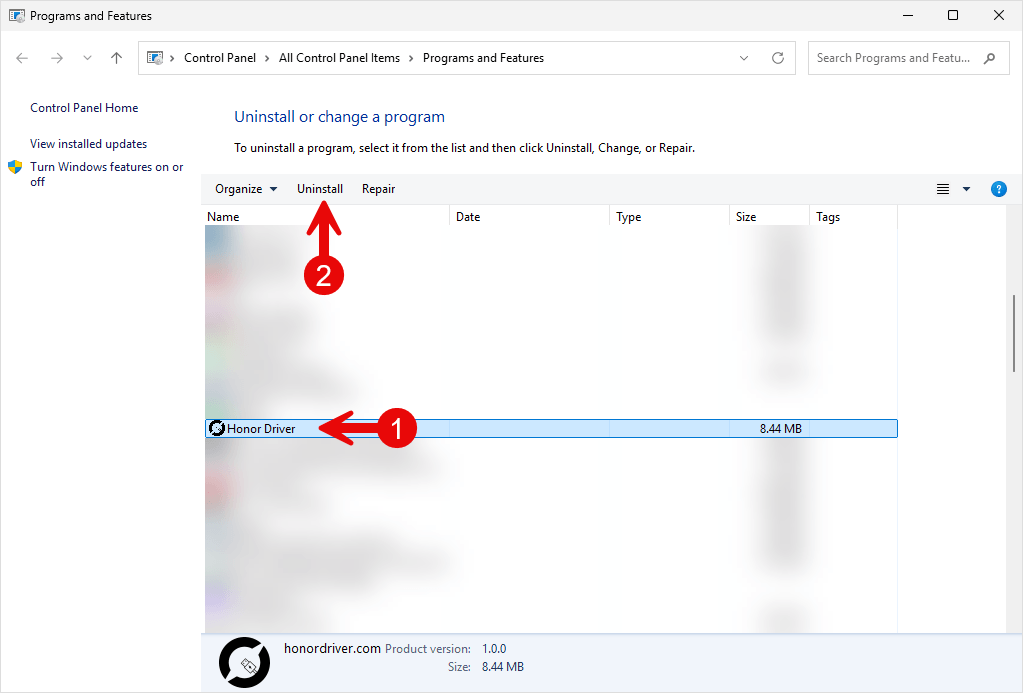
Windows+Rkey and typeappwiz.cpland click on the OK button. - Under Programs and Features Window, Locate the Honor Driver from the List and Click on the Uninstall button to Start the Removal process.
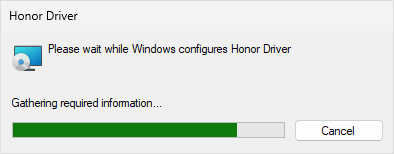
- Now, Honor Driver will be uninstalled from the Computer. This process may take a few seconds to complete.
- Honor Driver is now removed from the computer.
Congratulations! Now restart the computer. Once the computer is restarted, all the associated registry entries will be removed or deleted from the computer.
Notes:
[*] Download Honor Driver: You can download the latest Honor Driver from our Download Section.
[*] Honor Driver for Specific Model: If you are looking for the Honor Driver for any Specific model, then head over to our Devices page.
[*] Honor: If you are looking for the official Honor Stock Firmware, then head over to the Honor Firmware page.
[*] Install Honor Driver: If you want to learn how to install the Honor Driver, then head over to How to install Honor Driver page.
